



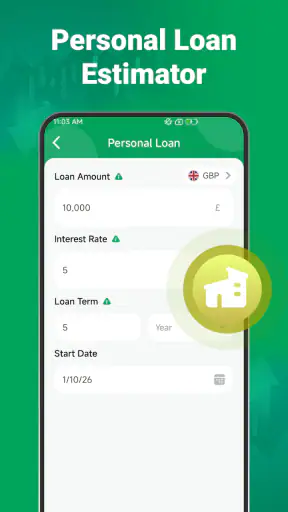
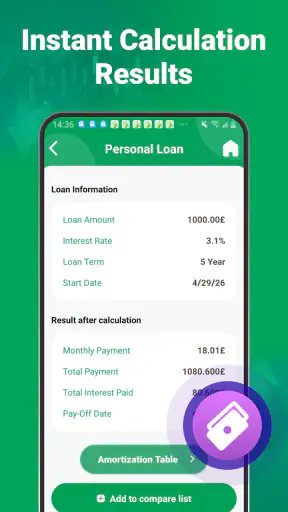
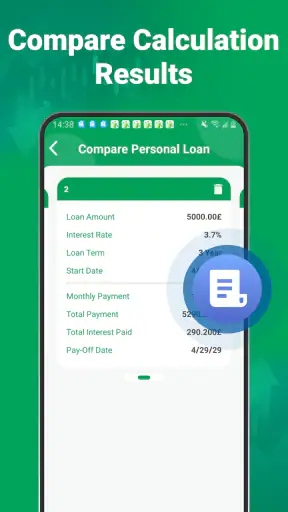
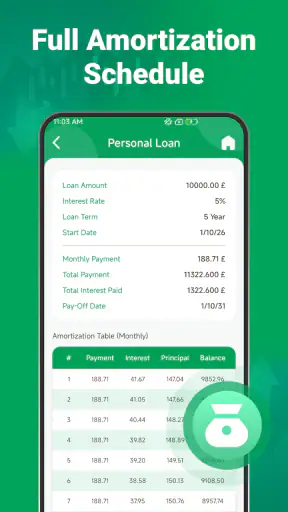
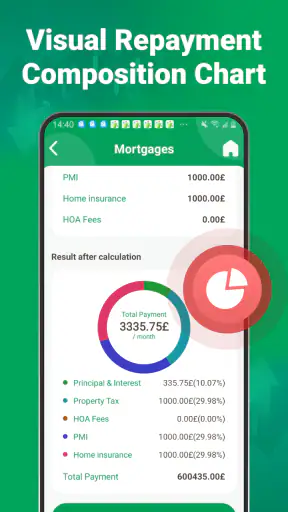

When I look at a finance app, I want one thing before anything else: a quick way to turn an uncertain money decision into numbers I can actually understand. Loan Calc Hub takes that practical route. It is a free Android finance app from AppDsgnur, built around calculations for loan repayments, fixed deposits, and recurring investments. I found its most useful role in the loan calculator, especially when I wanted to compare a borrowing idea with my monthly budget before treating it as a serious option.
The app is not a bank, lender, investment platform, or personal financial adviser. That distinction matters. It does not replace a formal offer from a financial institution, and its results should not be read as a promise of what a lender will approve. What it does well is give you a simple numerical starting point. Instead of relying on a lender’s headline payment or guessing from a rough percentage, you can test a scenario and see how the repayment changes when the amount, rate, or term changes.
That focused purpose explains why it has found a broad audience. The app has passed one million installs and holds a 3.6 average from roughly one thousand ratings. I would not treat that rating as proof that it suits every borrower, but it does suggest that people are using it for a straightforward, repeatable task. It is available to everyone, costs nothing to download, and the current version is 1.2.0.0. It requires Android 9 or later, so most reasonably recent Android phones should be able to run it.
Why the repayment calculator is the real centre of the app
The loan feature is valuable because borrowing decisions are often presented in the wrong order. People start with the amount they want, then ask whether the monthly payment feels manageable. I prefer reversing that process: begin with the payment I can comfortably handle, then work backward toward a sensible loan size and term. A calculator such as this makes that comparison much easier than doing repeated arithmetic by hand.
In everyday use, the important result is not just a single repayment figure. The useful insight comes from changing one input at a time. I might keep the loan amount fixed and compare a shorter term with a longer one. Then I might keep the term fixed and adjust the interest rate. That reveals the trade-off that promotional examples often hide: a smaller monthly payment can mean paying for much longer, while a shorter term can reduce the overall cost but put more pressure on each month.
The strongest use of Loan Calc Hub is not predicting an exact offer; it is exposing the cost of a decision before you commit to it. That makes the app particularly helpful at the early planning stage, when I am comparing possibilities rather than completing an application. It turns an emotional question—“Can I afford this?”—into several more useful questions: “What payment fits my budget?”, “How much extra does a longer term create?”, and “Would a smaller purchase be safer?”
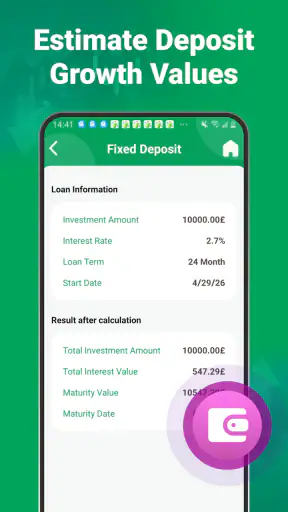
The same approach applies beyond personal loans. The fixed-deposit calculator can help someone estimate what a lump sum might become under a chosen deposit arrangement, while the recurring-investment calculation is useful for thinking about regular contributions over time. I see those tools as planning aids rather than forecasts. They help frame a conversation with a bank or an investment provider, but the final result can depend on the institution’s terms, taxes, compounding method, timing, and eligibility rules.
How I would use it before speaking to a lender
I would begin with a conservative loan amount, not the maximum amount that appears attractive. Next, I would enter the interest rate shown in a genuine lender example rather than using a promotional rate without checking its conditions. I would then compare at least two repayment periods. The point is not to find the lowest displayed monthly figure. The point is to see whether the payment still looks reasonable after allowing for rent, food, utilities, transport, savings, and unexpected costs.
A useful habit is to write down the assumptions beside each result. For example, I might label one calculation “smaller amount, shorter term” and another “larger amount, longer term.” Without those labels, it is surprisingly easy to remember only the most comfortable payment and forget why it looked comfortable. The app gives me the arithmetic, but I still need to keep track of what each result represents.
I would also run a stress check. If the rate is not fixed, I would calculate a less favourable version using a higher rate than the initial quote. If the payment becomes uncomfortable under that change, the original plan may be too tight. This is one of the more useful ways to use a basic calculator: not to create false precision, but to test how fragile the decision is.
There is another small but important discipline. I would compare the app’s output with the lender’s repayment schedule before signing anything. A calculator may use a standard repayment formula, while a real product can include fees, insurance, taxes, irregular payment dates, introductory rates, or other conditions. If the two figures differ, that is a reason to inspect the terms—not a reason to assume the app or the lender is automatically wrong.
A realistic household example
Imagine I am considering a loan for replacing an essential appliance and making a few related repairs. The first temptation might be to enter the full amount I think I can obtain. Instead, I would calculate the amount needed for the essential work, then a second version that includes the optional improvements. If the second version pushes the monthly payment into a range that would leave little room for emergencies, the calculator has already helped me make a better decision.
I would then compare a shorter repayment period with a longer one. The longer option may look easier each month, but the additional time can make the purchase more expensive overall. The shorter option may save money in total, yet it could be a poor choice if it leaves no room for ordinary household fluctuations. In this situation, the best result is not necessarily the lowest total cost or the lowest monthly payment. It is the version that leaves enough breathing room while keeping the total borrowing sensible.
That is where this app feels more useful than a quick search result. Search engines can show generic repayment examples, but they do not adapt as naturally to the exact combination I am considering. A spreadsheet can do much more, but it takes longer to build and requires me to understand the formulas. Loan Calc Hub sits between those two options: faster than building a model, and more personal than reading a generic example.
Where the other calculators fit
The fixed-deposit and recurring-investment tools broaden the app beyond borrowing. I would use the fixed-deposit option when I have a lump sum and want to think through a deposit outcome under a stated rate and period. The recurring-investment option suits a different habit: contributing a regular amount and seeing how the result may develop under an assumed return. Having both alongside the loan tool makes the app useful for comparing two sides of a money decision—borrowing for something now versus setting aside money for a future goal.
Still, I would not confuse a recurring-investment estimate with a guaranteed balance. Investment returns can vary, and a calculator cannot remove market risk. Likewise, a fixed-deposit estimate should be checked against the institution’s actual interest method and conditions. The app is strongest when I use it to compare assumptions, not when I treat its final number as a contract.
Compared with a bank’s own calculator, this app may be more convenient for an early, provider-neutral comparison. A bank calculator is usually better once I know the exact product, because it can reflect that institution’s rules and fees. Compared with a spreadsheet, Loan Calc Hub is easier for a quick check, while a spreadsheet gives me more control over irregular payments, changing rates, extra repayments, and a full household budget. Compared with mental arithmetic, the app is clearly safer for repeated comparisons, where small mistakes can change the conclusion.
The trade-off is simplicity. A focused calculator is approachable because it does not require me to build a financial model, but that same simplicity means I should not expect a complete affordability assessment. Someone who needs a detailed debt plan, a full investment projection, or a record of multiple accounts will probably outgrow it. For that person, a budgeting app, a spreadsheet, or professional advice may be a better next step.
Small workflows that make the results more useful
My first tip is to change only one variable per comparison. If I alter the amount, rate, and term all at once, I learn very little about what caused the payment to move. Holding two inputs steady makes the result easier to interpret and helps me spot whether a longer term is doing most of the work.
My second tip is to calculate the same goal from both directions. I can enter the amount I want to borrow and inspect the payment, then start with the payment I can afford and see what loan amount fits. These two views often reveal a gap between what I want and what my budget can responsibly carry. That gap is more valuable than a single attractive result.
My third tip is to use the investment calculators as comparison tools rather than as encouragement to chase a target. For a recurring contribution, I would test a smaller amount that I could maintain during an ordinary month, then compare it with a more ambitious amount. A plan that is slightly slower but sustainable is more useful than an optimistic estimate that I would abandon after a few payments.
I would also keep a written note of the rate and period used for each calculation. This is especially important when comparing results on different days or discussing them with another person. A number without its assumptions can be misleading, even when the arithmetic itself is correct.
Limitations I would keep in mind
The main limitation is that a calculator can show repayment mathematics but cannot judge my wider financial situation. It does not know whether my income is stable, whether I already have other debts, or whether a future expense is about to arrive. I still need to account for those things separately. A payment that fits on paper may be uncomfortable in real life if my budget is already stretched.
There is also a difference between a clean estimate and a lender’s final calculation. Fees added to the balance, charges paid separately, changing rates, payment frequency, and rounding can all affect the amount actually charged. If a lender quotes a total cost that does not match the app, I would inspect the product terms before making a decision. The app is a reference point, not the legal document governing the loan.
The age rating of Everyone is appropriate for a general-purpose calculator, but that should not be mistaken for a recommendation that every user should borrow or invest. Younger users can learn from the calculations, yet any real financial decision still needs suitable adult guidance and a clear understanding of the terms involved.
Another practical limitation is platform reach. This is an Android app, and the minimum requirement of Android 9 means anyone using an older device will need a newer phone or a different method. For Android users, that requirement is modest. For someone who works across Android, iPhone, and desktop, a web-based calculator or cross-platform finance tool may be more convenient because the same figures can be accessed in more places.
Who will get the most from it
I think Loan Calc Hub is a good fit for someone who wants a quick, uncomplicated way to compare borrowing scenarios before contacting a provider. It is also useful for a person starting to plan a fixed deposit or recurring investment and wanting to understand how changing the amount, rate, or duration affects the estimate. Students, first-time borrowers, and households preparing for a large purchase can benefit from that low-friction approach, provided they treat the numbers as planning estimates.
It is less suitable for someone who needs account tracking, reminders, transaction categorisation, credit monitoring, or a complete household budget. It is also not the right main tool for a complex loan with irregular repayments or a changing interest structure. In those situations, I would move to a detailed spreadsheet, the provider’s own schedule, or qualified financial advice.
My overall view is positive but deliberately practical. The app earns its place by making comparisons quick and understandable, especially around the central question of how a loan term changes the balance between monthly comfort and total cost. Its free price removes an easy barrier to trying it, and its additional deposit and recurring-investment calculators make it more versatile than a single-purpose repayment tool.
I would recommend it to a friend who wants to test an idea before making a financial commitment. I would tell that friend to enter realistic assumptions, compare scenarios one variable at a time, and verify the final figures against the actual provider’s terms. Used that way, Loan Calc Hub is not a substitute for financial advice or a formal quote. It is something more modest and genuinely useful: a quick way to make the consequences of a money decision easier to see.


